The Invisible Drain: How Trimble SiteVision 2026.10 Redefines Site Visualisation

Insights from BuildingPoint Australia’s Aaron Cartridge on the unignorable necessity of collaborative visualisation, and the invisible cost hitting your balance sheet.

The Cost of Poor Collaboration: Why Reality Capture & Site Visualisation Matter

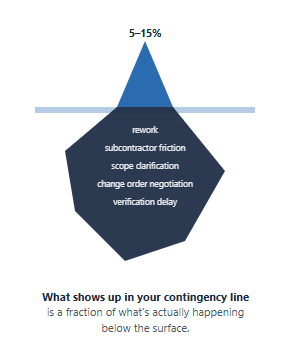
You run a disciplined coordination process, your BIM is robust, your pre-construction meetings are thorough, and yet, on most projects, you’re still losing 5–15% of your built-in programme contingency to issues the design team had already resolved in the model three months earlier.

A mechanical duct clashes with electrical conduit at ceiling level, your frame is already in, rework takes eight days, and this is all before the inevitable subcontractor friction that follows. A structural corner doesn’t quite match the architect’s intent, and the client notices during handover inspection. You negotiate a scope clarification (read: variation negotiation), all for your commercial team to spend two weeks on a problem that should have been verified in week three.

The problem usually isn’t that the coordination work has failed. It’s that the design intent is locked in the model, while the people making real-time decisions on-site need something clearer, faster and easier to act on.
The Invisible Drain: How Trimble SiteVision 2026.10 Redefines Site Visualisation

For main contractors managing $200M+ in annual revenue, the impact of this gap depends on your vantage point:

  • Construction Manager: You’re defending schedule and managing trade relationships. Coordination issues create pressure from both directions: the design team wants confirmation, the field understands the intent, the trades want clarity before committing resources. You’re the translator in a system that shouldn’t need translation.
  • Project Director: You’re watching margin evaporate on coordination work that’s already been done once (in the office). Variations tied to site verification, rework, and extended schedules are your biggest unbudgeted cost driver outside of labour inflation.
  • Commercial Director: You’re fielding late-stage client concerns, managing scope clarifications, and navigating variation conversations that should have been closed in pre-construction.

In each case, the underlying issue is the same: the information exists, but it is not reaching the people who need to act on it quickly enough. So teams fall back on site visits, phone calls, manual measurements and delayed walkthroughs. All slow, disconnected ways to manage decisions that should be tied directly to your design data.

So how much is this coordination problem costing you, and what would it be worth to resolve it?

SiteVision-2026

Why This Moment Matters

For the past decade, site verification has been reactive and disconnected. You either hire a surveyor, hope to spot the problems during a walkthrough, or hear about them when there’s rework. These approaches work, but they’re isolated from your actual project management system. The data lives in silos, and nothing flows back into your coordination process. Your subcontractors don’t see it. Your client never knows you caught and resolved the issue early.

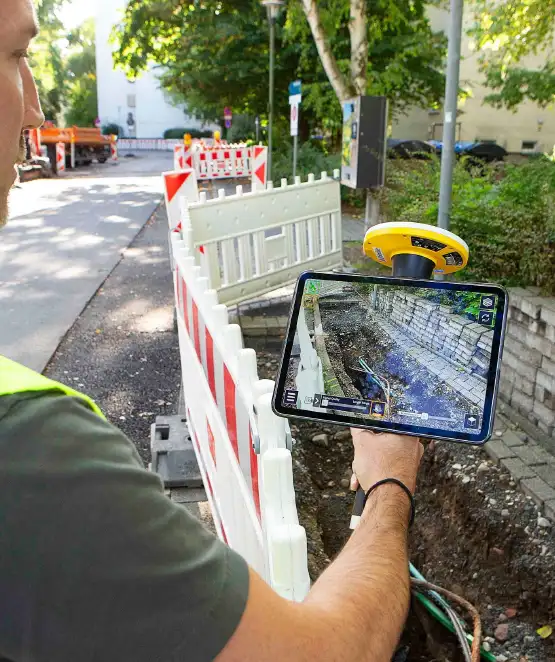
What’s changed isn’t just that lidar scanning got cheaper. It’s that you can now see your design intent overlaid on the physical site in real time: your BIM and your actual conditions visualised together at 1:1 scale, making verification visual and contextual, not abstract. SiteVision 2026.10 fuses accurate lidar scans with that AR capability and your existing project workflow in Trimble Connect, so verification becomes a management practice embedded in how you already collaborate, not a separate task that produces reports nobody uses.

Here’s what that means operationally:

Visibility becomes a management system, not an event. You’re not waiting for scheduled site inspections or specialist 3rd party contractors. Your project teams can verify conditions in real time, capture georeferenced point clouds, and sync that data directly into your project management platform. The field and the office aren’t two separate workflows anymore, they’re one integrated view.

Early detection becomes standard, not exceptional. When your structural frame is verified against the design before MEP trades arrive, clashes are resolved at the design phase, not the construction phase. Cost of change: $5,000–10,000. Cost of rework: $50,000–150,000.

Stakeholder management shifts from reactive to proactive. Your client sees verified conditions in context with the design, not a surprise during final inspection. Your subcontractors can see the real constraints before they commit resources. Scope clarifications happen early, not in variation negotiations.

Margin becomes predictable. Instead of budgeting for “coordination contingency”, you’re actively managing coordination risk in real time.

The Economics: What's at Stake

Let's ground this in numbers that matter to your business.

Per-Project Cost of Late Coordination Issues

Rework labour (8–12 days per issue)
$40,000–80,000
Subcontractor delay & friction
$20,000–50,000
Schedule extension (cascade effect)
$15,000–40,000
Client negotiation & variation overhead
$10,000–25,000
Total per issue $85,000–135,000

Most mid-size projects can easily see 2–4 coordination issues that slip into construction despite solid pre-construction work. That's $170,000–780,000 per project in unbudgeted coordination cost. Multiply that across your portfolio — a builder running 8–10 projects annually is carrying $1.4M–7.8M in annual coordination risk.

When You Catch It Changes Everything

Early Detection — In Design Phase
$5,000–15,000
1–2 weeks to resolve — usually designed out before construction
Late Detection — During Construction
$50,000–150,000
1–2 weeks of schedule delay plus rework

Coordination issues happen — but shifting the decision point earlier is what keeps cost, disruption, and commercial risk manageable.

The return on investment is visible: even catching one issue per project in the early phase saves $35,000–135,000 per project. At an annual cost of ~$2,550 per user, you break even on the first issue on the first project.

How It Changes Your Workflow (Three Critical Moments)

1. Pre-MEP Verification (Week 3–4 of Structural Work)

Your structural frame is substantially complete. Before mechanical and electrical trades mobilise, your site team loads SiteVision, positions the BIM model against the actual structure using GNSS or QR markers, and captures a 3D lidar scan of the critical zones (ceiling grid, major penetrations, duct routes).

The scan is processed on-device in two minutes. Any variance from design shows immediately in colour-coded point cloud overlays. Your construction manager can spot the electrical conduit routing conflict before the MEP contractor has committed material and labour.

What changes: You're verifying at design confidence level, not discovery level.

Previous Workflow

Rely on subcontractor coordination meeting → wait for trade to mobilise → discover clash during rough-in → crisis meeting → rework.

Time to resolution2–4 weeks
Cost$80,000–150,000
SiteVision Workflow

Overlay MEP model 1:1 in structural zone → identify variance → notify design team in-app through BCF Topic → design solution before trade mobilisation.

Time to resolution1 week
Cost$8,000–15,000

2. Real-Time Stakeholder Engagement (Throughout Construction)

Your project director needs to update the client on structural completion. Instead of a site walkthrough with the client looking at an unfinished ceiling, your commercial director logs into Trimble Connect Reality Capture Platform (where the point cloud has automatically synced) and shares a link showing the verified structural condition in context with the BIM model.

The client sees what's been built and what's remaining without setting foot on-site. They understand progress in context with the design intent. Scope clarifications that would normally emerge at final inspection are flagged during construction, when they're cheap to address.

What changes: Client confidence moves from reactive (surprise at handover) to proactive (informed throughout construction).

Impact: Fewer scope clarification conversations, fewer variation negotiations, higher client satisfaction scores.

3. Commercial and Variation Management

Your commercial director is managing a scope clarification conversation with the client over a finish detail that wasn't clearly specified in the contract. Rather than relying on photographs or site descriptions, the team pulls up the relevant point cloud scan from the Trimble Reality Capture Platform, shows the client exactly what was built, and contextualises it against the design model.

The conversation shifts from "here's what we think happened" to "here's what actually happened, in context with the design intent."

What changes: Variation negotiations are grounded in verified data, not argument.

Impact: Faster resolution, less litigation risk, clearer paper trail.

Addressing the Implementation Question

Senior leadership’s first instinct is often: “This sounds good, but will our teams actually use it?”

That’s the right question. Adoption hinges on two things:

1. Ease of deployment across the portfolio

The 4-step configuration wizard means your site managers can deploy SiteVision without IT support or specialist training. You’re not creating a new specialist skill. You’re enabling existing site teams to do verification work they’re already doing, but faster and with better data.

2. Integration with existing workflows

The integration question is real: if point clouds live in a separate system from your project workflow, adoption stalls. SiteVision solves this by syncing directly into Trimble Connect, which becomes a visual communication hub where your model, scans, and point clouds exist together in context.

When your site team identifies a variance using AR, they’re not generating a separate report. They’re capturing it in the same environment where your design team, commercial team, and subcontractors can see the exact same model, the exact same scan data, and the exact same context. A clash isn’t described in an email. It’s shown: your BIM overlaid on the point cloud, at 1:1 scale, visible to everyone who needs to make a decision.

That integration matters because it removes translation. Your construction manager doesn’t need to explain what they’re seeing. Your project director doesn’t need to interpret a report. Your subcontractor doesn’t need a separate briefing. Everyone sees the same visual reality.

The change management isn’t about learning new software. It’s about replacing email and site meetings with visual certainty.

SiteVision-2026

What Changed in 2026.10: Why Now

Previous versions of SiteVision were powerful for visualisation and client engagement. The 2026.10 release transforms it into a management system for site verification.

Key improvements:

  • Scanning works indoors and in poor GNSS areas – Removes the restriction that made previous versions unreliable for multi-storey work.
  • On-device post-processing – Your team confirms scan quality on-site. No surprises when data syncs to the office.
  • Project-based workflows – Teams work from a shared coordinate system, not individual calibration files. Scales across your portfolio.
  • Automatic cloud integration – Point clouds sync to Trimble Connect and the Reality Capture Platform. Zero manual handoff.
  • Simplified GNSS setup – The 4-step wizard removes the technical barrier. Your site manager can configure it.

For the leadership team, the critical upgrade is the integration story. Data flows automatically from field to office to stakeholders. That’s the difference between a verification tool and a management system.

The Broader Picture: Connected Construction

SiteVision 2026.10 is built on Trimble's Connected Construction principle: verification data flows into the same ecosystem where your teams collaborate on project delivery. That means integration with your project collaboration tools, your construction management platform, your surveying workflows, and your field operations, creating a unified visual workspace instead of disconnected data silos.

For your organisation, this matters because:

Portfolio Visibility

You're not managing coordination risk on individual projects — you're managing it as a portfolio capability. Early detection patterns become visible across your business.

Scalability

As your process matures, you can standardise verification workflows across all projects, all teams, all regions.

Stakeholder Integration

Clients, consultants, and subcontractors access the same data in the same platform. No separate systems, no translation layer.

That's the vision that separates a tactical tool from a strategic capability.

Three Questions to Guide Your Next Step

If you’re managing $200M+ in annual revenue:

  1. How much annual margin are you carrying in coordination-related rework and schedule extension? Rework-related costs, particularly coordination issues, consume 4–9% of total project value across the construction industry. For a main contractor managing $200M in revenue, that represents $600K–1.5M annually in margin being eroded by coordination problems that should have been caught before trade mobilisation.
  2. How many projects per year could benefit from real-time field-to-office verification before major trade mobilisation? If it’s more than 3–4 projects, the ROI math is clear.
  3. What would portfolio-wide visibility into coordinate conditions look like for your commercial and construction teams? (This is the strategic question that separates early adopters from followers.)

If any of those numbers feel significant, SiteVision is worth a 30-minute conversation with BuildingPoint NZ.

Next Steps

BuildingPoint NZ delivers SiteVision with implementation support, training, and ongoing technical guidance. We work with your construction and commercial teams to scope the right pilot projects, ensure adoption, and scale the capability across your portfolio.

Schedule a conversation with our construction technology team to explore how SiteVision fits into your portfolio strategy and cost management approach.

Or reach out to your BuildingPoint account manager directly. We’ll walk you through a project scenario that matches your typical coordination challenges and show you the timeline and cost impact in context.